
Written by the team behind Pain Journal, so treat the section about our own app accordingly. Everything else here is the rubric we would use if we were choosing. This is general information, not medical advice, and app pricing changes often, so check any current plan yourself before you decide.
If you are reading this a few days before an appointment, here is the short version. Pick any app that will produce a dated document you can hand over, install it today, and log honestly for whatever time you have left. The document matters more than the app.
Why "free" is the wrong question
Nearly every pain tracker in the store is free to download and free to log in. That is not where the money is. The money is at the exit: the summary, the export, the PDF, the thing you actually take to the visit. A lot of apps let you build months of history and then meter the report, either as a subscription or as per-report credits, which lands exactly when you need it and cannot wait.
So the real question is not is this app free. It is will this app give me my history back in a form a clinician can read, without asking me for money on the morning of the appointment.
The five questions that decide it
These are in order of how much they matter for a visit, not how much they get advertised.
1. Is the report free, and what exactly is in the free one?
Check this before you log a single entry, because it is the one thing you cannot work around later. Look for the words credits, tokens, export, premium report, or a date-range limit. A free tier that exports only the last seven days is still useful, as long as you know that going in and time your logging to it.
2. Can it record where, not just how much?
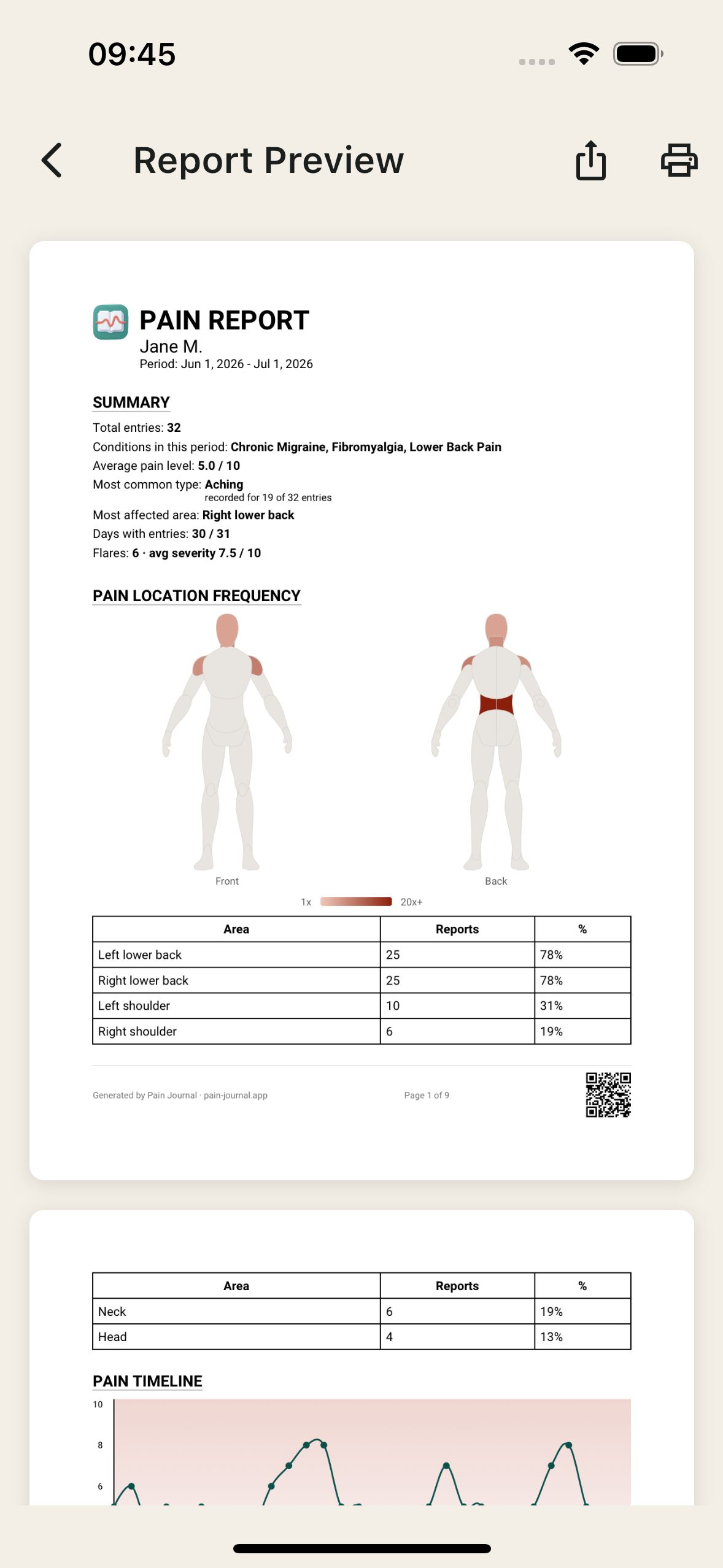
A 0-10 number tells a clinician how loud the pain is, not what it is. If your pain moves, or covers several areas, or is the widespread kind that comes with fibromyalgia, an app with a single location field will quietly throw away most of what you record. A body map you tap keeps that information, and it survives into the report as a picture, which is far faster to read across a desk than a table.
3. Does it cover the period the appointment covers?
Appointments look backwards over months. If the free report is capped to a week, you either upgrade or you plan around it. Neither is wrong, but find out which one you are doing before the week you need it.
4. Does it need an account, and where does the data live?
Your pain history is medical information about you. Some apps require a sign-up and hold entries on their servers, some keep everything on the phone and work with no connection at all. There is no universally right answer, cloud sync is genuinely useful if you change phones, but it is worth a deliberate choice rather than a default.
5. Can you actually face using it on a bad day?
This is the one that decides whether you have any data at all in six weeks. An app that takes two minutes and eleven fields per entry will be abandoned during the exact flare it most needed to capture. Ten seconds with sore hands and brain fog is the bar. Any tracker you will still open on your worst day beats a better tracker you gave up on.
How the main options compare
These are the apps that come up most often in chronic pain communities. Feature sets and prices move, so this is a description of what each one is for rather than a claim about today's plan details.
Pain Journal (ours)
Built around one decision: the doctor report is free and stays free. You tap a 39-zone front and back body map, the diary kind of pain locator app, rate it, and the free PDF covers the last 7 days with the body map shaded by the worst pain at each site, the week's summary and your day-by-day entries. No account, no sign-up, works fully offline. Premium is optional and adds 30-day, 90-day and custom report windows, the per-area table with typical and worst pain, the timeline chart and medication effectiveness analysis. iPhone, iPad and Android. The honest limitation: it is a pain and symptom diary, not a program, so there are no exercises, no coaching and no therapy content in it.
Manage My Pain
The longest track record in this category and a deservedly good reputation for detailed, structured reports that clinicians are used to reading. If a rich report is your priority and you are willing to pay for it, this is the obvious comparison to make against ours. Check its current plan for what a report costs on the free tier before you commit months of logging to it.
Bearable
Broader than pain: mood, sleep, energy, medication, food and other factors, with correlation views on top. The right choice when your real question is "what is driving this" across several conditions rather than "what do I hand my doctor on Thursday". Worth checking which parts of the export sit behind its paid tier.
Condition-specific trackers
There are dedicated apps for endometriosis, migraine, hypermobility and more, and if you have exactly one condition they often fit its vocabulary better than a general tracker. The trade-off appears when a second diagnosis arrives, which in chronic illness it frequently does, and your history is now split across two apps that cannot produce one document.
Paper
Genuinely fine, and better than an app you will not open. It is free, needs no trust in anyone, and a handwritten page hands over exactly as well as a printed one. The cost is that you do the summarising yourself, and summarising six weeks of entries by hand the night before an appointment is its own small misery. We keep a free printable pain diary here for anyone who wants to start that way.
What to do if the appointment is soon
Three things, in this order. Install something today and log tonight, even roughly. Two days before the visit, generate the report and read it yourself, because that is when you find out the export is gated or the date range is wrong, and you still have time to fix it. Then write your one opening sentence from what the report shows, using the shape in our guide on how to describe your pain to a doctor.
Common questions
What is the best free app to track pain for a doctor?
The one that will hand you a document at the end without asking for money. Most pain trackers are free to
log into and charge for the export, so the useful test is not whether the app is free to download but
whether the report is free. Pain Journal generates a doctor-ready PDF on the free tier with no credits and
no per-export fee. Manage My Pain and Bearable are both well established and worth a look, but check their
current plans for what the report or export costs.
Do I need a paid pain tracking app to bring something to my appointment?
No. A free app or even a printed paper diary is enough, as long as what you hand over is dated, covers the
whole period since the last visit, and shows the pattern rather than how you feel that morning. Paid tiers
mostly buy longer date ranges, charts and correlation analysis, which matter more after several months of
data than before your first appointment.
Is a body map better than a 0 to 10 pain scale?
They answer different questions and a good record has both. A number says how much, a body map says where,
and where is the part that gets lost when widespread or moving pain is squeezed into one location field.
If your pain moves or affects several areas, an app that only stores a single region will lose most of your
history.
Does a pain tracking app need an account?
Not necessarily. Some apps require a sign-up and store entries in their cloud, others keep everything on
the device and work offline. If your pain history is something you would rather not hand to a company,
check for an offline-first app that works with no account. Pain Journal has no sign-up and keeps entries on
the device.
How long should I track before an appointment?
Two weeks of honest daily entries is enough to show a pattern, and even a few days beats arriving with
nothing. If the appointment is tomorrow, log the last few days from memory, mark clearly that they were
filled in afterwards, and start logging properly from today.
All third-party names belong to their respective owners and are used for comparison only. We have no affiliation with the other apps described here.